hotplugg app icon

Introducing

hotplugg

Your accessories deserve a grand entrance.


Every plug-in, heard.

hotplugg is a lightweight system tray app that plays a satisfying sound every time you connect or disconnect an accessory — USB sticks, headphones, monitors, power adapters, and more.

Universal Device Detection

Detects USB drives, keyboards, mice, HDMI / DisplayPort monitors, audio jacks, AC power adapters, and more — on all three platforms.

Custom Sound Sets

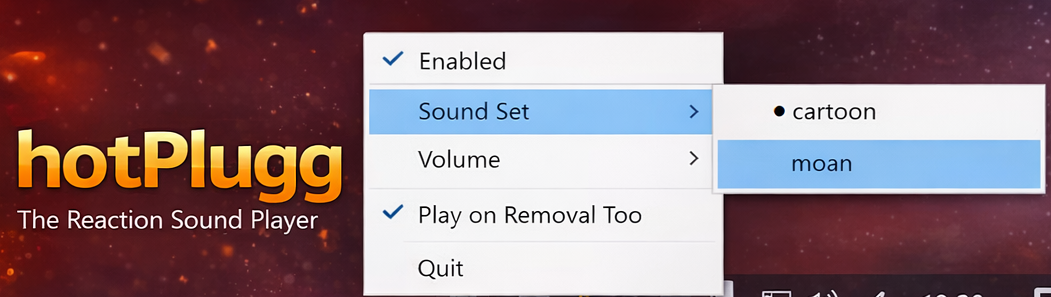
Swap between included sound packs — cartoon boing effects or the satisfying moan set. Drop in your own WAV / MP3 / OGG / FLAC files to create a custom set.

Cross-Platform

Built with Rust for native performance on Windows, macOS (Intel + Apple Silicon), and Linux. One codebase, zero compromise.

Lives in Your System Tray

hotplugg runs quietly in the background. Right-click the tray icon to toggle sound, switch sound sets, adjust volume, or quit — no bloated UI, no distractions.

TOML Config

A single, human-readable config file lets you fine-tune volume, sound set, deadtime, and whether to play on disconnect — no GUI required.

Zero Overhead

Event-driven architecture means hotplugg sits at ~0% CPU when idle. Written in Rust — fast, safe, and tiny. The binary is just a few MB.


Simple by design.

hotplugg banner — system tray app concept
hotplugg tray menu screenshot
hotplugg in action screenshot

Download hotplugg

Pick your platform below.

Windows
.exe Installer
Microsoft Store
Windows 10 / 11
macOS
Universal .dmg
Linux
.deb / .tar.gz